Century Inventory Pro
Automatic EAN reading with full traceability — ready from day one under GS1 and ISO standards.

Overview
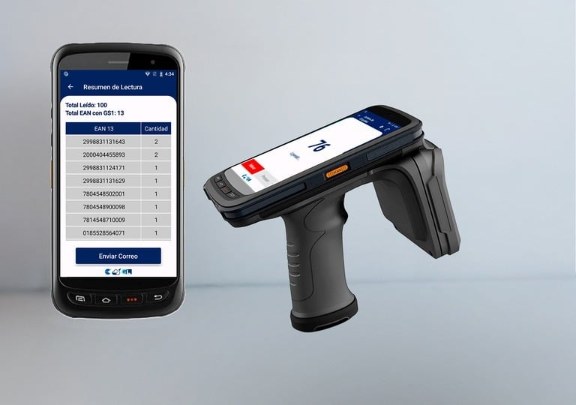
Century Inventory Pro reads GS1-encoded RFID tags and gives you the EAN of every item automatically, with full traceability. Read an area with the handheld and see the total tags read and the units per EAN — ready to send by email.
Because it follows GS1 and ISO standards, implementation is immediate and compatible with tags encoded anywhere in your supply chain.
- Level
- 2 — EAN & GS1
- Runs on
- Android RFID handheld (app)
- Connection
- Online
- Identification
- EAN decoded automatically from GS1 tags
- Standards
- GS1 · ISO
- Results
- Read summary by EAN, sent by email
- Best for
- Retailers and brands with GS1-encoded merchandise
Demo & quote
Implemented, trained and supported by the GL Retail team from Miami for the USA, the Caribbean and Latin America.
Read, decode, review, send.
Your tags already carry the product code. Century Inventory Pro reads it — nothing to load or link first.
Read
Point the handheld at a shelf, a rack or a box and read every tag in range at once.
Decode
Each GS1 tag is translated to its EAN-13 automatically.
Review
See the total tags read and the quantity per EAN on screen.
Send
Email the read summary to your team in one tap.
| EAN 13 | Qty |
|---|---|
| 2998831131643 | 2 |
| 2000404455893 | 2 |
| 7804548502001 | 1 |
| 7804548900098 | 1 |
| 7814548710009 | 1 |
| 0185528564071 | 1 |
Global standards, immediate results.
Built for operations where tags are encoded with GS1 from the source.
Automatic EAN reading
Every GS1 tag becomes its EAN-13 — no manual lookup.
Immediate implementation
No item master to load and no tags to link before you count.
GS1 & ISO compliant
Compatible with tags encoded by your suppliers worldwide.
Full traceability
Know exactly which products, and how many, were read where.
Units per EAN
A clear summary by product, ready for reconciliation.
Share in one tap
Send the read summary by email straight from the handheld.
Made for GS1 retail.
Century Inventory Pro runs on Android RFID handhelds. Need GS1-encoded tags? Our Service Bureau prints and encodes them for you. See RFID handhelds · All products
Questions we hear often.
How is it different from Century Inventory?
Do my tags need to be GS1-encoded?
Does it need an internet connection?
Can it connect to my ERP or WMS?
The rest of the Century family
Same RFID approach, more power at each level. Start where you are and move up when you need to.
 Level 1 · Plug & play
Century Inventory
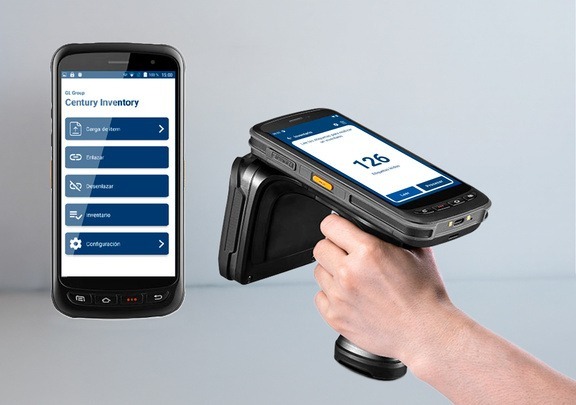
Count your stock the same day: load your items, link their tags and run unlimited counts, with results by email.
- Offline — no internet needed
- Unlimited counts, results by email
- Ideal for fast, decentralized rollouts
 Level 3 · SaaS
Century Cloud
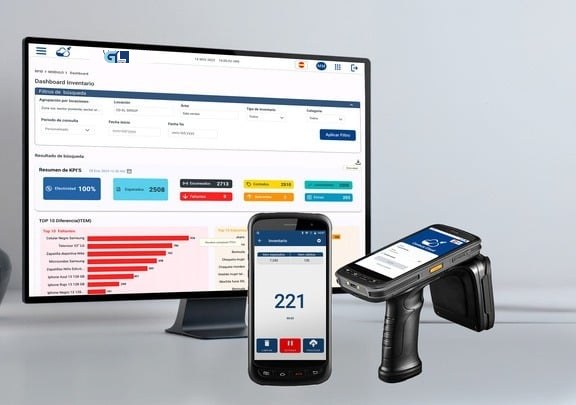
Cloud platform for computer and handheld, with six modules, live dashboards and a REST API for your ERP, WMS and POS.
- Inventory, Movement, Sales, Loss prevention, Picking, Replenishment
- Real-time dashboards from any location
- REST API integration with ERP, WMS and POS
It's time to transform your business.
See Century software running on your own products. Tell us how you operate and we'll show you the right level.
Request a demo