Century Cloud
One cloud platform to centralize, analyze and optimize all your RFID management in real time — from anywhere.

Overview
Century Cloud is RFID software for inventory management and full traceability in retail and logistics. It improves accuracy and visibility across the product lifecycle, reduces errors in inventory, movements and sales, and strengthens loss prevention with advanced alerts.
It runs in the cloud: use it from any computer's web browser and from RFID handhelds, so headquarters, stores and warehouses share the same data in real time — and a REST API connects it to your ERP, WMS and POS.
- Level
- 3 — SaaS
- Runs on
- Any computer, in the cloud (web browser) + Android RFID handhelds
- Delivery
- Cloud (SaaS) — no servers to install
- Modules
- Inventory · Movement · Sales · Loss prevention · Picking · Replenishment
- Integration
- REST API — ERP, WMS, POS
- Best for
- Chains, distribution centers and multi-site operations
Demo & quote
Implemented, trained and supported by the GL Retail team from Miami for the USA, the Caribbean and Latin America.
Results reported by GL Group for Century Cloud in retail and logistics.
Six modules. The whole product lifecycle.
Turn on what your operation needs today and add more as you grow — all in one platform.
Inventory
Counts by location and area, comparing expected against found so you see the differences that matter.
Movement
Track receiving, dispatch and transfers between stores, warehouses and distribution centers.
Sales
Connect sales to your RFID stock so on-hand figures stay accurate.
Loss prevention
Advanced alerts on unexpected item movements to act before stock disappears.
Picking
Guide order picking with RFID and confirm every item before it ships.
Replenishment
Inventory by sector — back room vs. sales floor — to refill shelves faster and cut stockouts.
Reads turned into decisions.
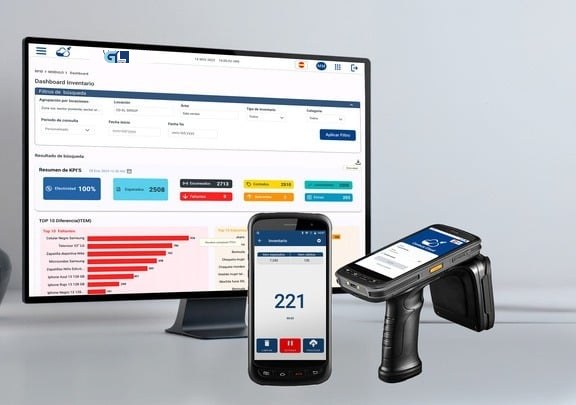
Live dashboards show what you have, where it is and what's missing — for one store or the whole chain.
Filter what matters
By location, area, inventory type, category and date range.
See the KPIs at a glance
Effectiveness, expected vs. found, missing and surplus units.
Find the differences
Top items with the biggest gaps, so teams fix what matters first.
Act from anywhere
Same data on any computer, phone and handheld, in real time.
From the tag to your ERP.
Century Cloud sits between your RFID reads and your business systems.
RFID labels
Every item carries its own unique ID.
Handhelds & readers
The Century app and RFID hardware capture the reads.
Century Cloud
Centralizes, analyzes and shows it all in real time.
ERP · WMS · POS
REST API to SAP, Oracle and your own systems.
Total control of your RFID operation.
Visibility, control and integration in one platform — for one store or the whole chain.
Real-time visibility
Know real on-hand stock at every location, continuously.
Fewer stockouts
Faster replenishment keeps products on the shelf and sales up.
Loss prevention alerts
Advanced alerts flag unexpected movements as they happen.
Full lifecycle traceability
Follow each item from receiving to sale.
Connects to your systems
REST API integration with ERP, WMS and POS.
Multi-site by design
Stores, warehouses and DCs in one platform.
Questions we hear often.
Do I need to install servers?
Can it connect to SAP, Oracle or my WMS?
Do I have to use all six modules?
What hardware does it work with?
The rest of the Century family
Same RFID approach, more power at each level. Start where you are and move up when you need to.
 Level 1 · Plug & play
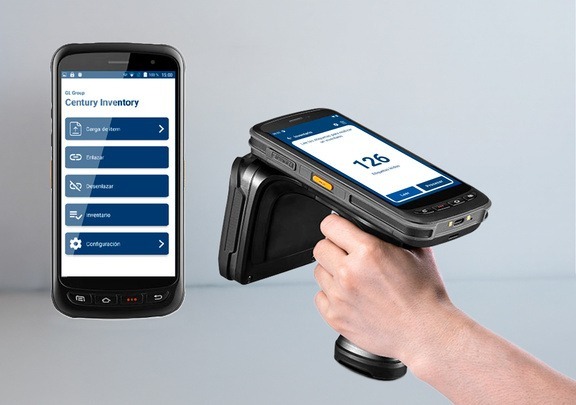
Century Inventory
Count your stock the same day: load your items, link their tags and run unlimited counts, with results by email.
- Offline — no internet needed
- Unlimited counts, results by email
- Ideal for fast, decentralized rollouts
 Level 2 · EAN & GS1
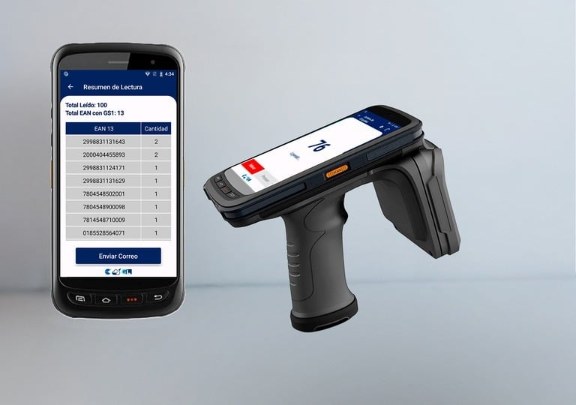
Century Inventory Pro
Read GS1-encoded tags and get units per EAN instantly — global standards, immediate implementation.
- Online — EAN decoded from GS1 tags
- Read summary by EAN, sent by email
- GS1 and ISO compliant for global compatibility
It's time to transform your business.
See Century software running on your own products. Tell us how you operate and we'll show you the right level.
Request a demo